Product Design

WellEarned

A management platform for talent agencies, designed from the ground up.

WellEarned is building the platform that talent agents had been improvising out of spreadsheets. I designed it from the ground up — one place for the roster, the calendar and the pipeline, so the administrative work stops competing with the talent.

WellEarned — the finished product
Role
Interaction Designer, User Experience Designer
Toolkit
Figma, ChatGPT, Photoshop, Illustrator
Team
Soumya Sharma, Guru Yerramilli, Shreyans Sheth

01 The brief

Five tools, one roster, and no single place the truth lived.

Talent agents were running entire careers out of spreadsheets, calendars, email and notes.

The juggling act cost them the thing they were hired for. Opportunities went missing between an inbox and a spreadsheet, two auditions landed on the same afternoon, and hours a week disappeared into administration instead of into talent.

A prettier dashboard wouldn't have fixed that. The brief asked for a single source of truth — rosters, scheduling and sourcing in one place — and four things had to be true by the time I was finished.

The map below names all eleven of the tools the platform had to absorb, and the job each one was doing.

  1. O-01

    One searchable roster

    Centralise all talent information into a single, easily searchable roster.

  2. O-02

    Scheduling that can't collide

    Simplify the scheduling process so double-bookings stop being possible.

  3. O-03

    Sourcing that stays in one place

    Streamline the sourcing of new talent and industry contacts.

  4. O-04

    A quarter of the admin, gone

    Reduce the time agents spend on administrative tasks by at least 25%.

Six jobs, eleven tools, and a person in the middle holding it together

the stack, as it stood

The agency desk one agent, in the middle of all eleven

  1. W-01 Roster management who the agency represents
    • Microsoft Excel
    • InEntertainment
  2. W-02 Lead sourcing where the next opportunity comes from
    • Casting Networks
    • Breakdown Services
    • Gmail
  3. W-03 Scheduling auditions, bookings, availability
    • Google Calendar
  4. W-04 Bookkeeping and invoicing — money in, money out
    • QuickBooks
    • Plaid
  5. W-05 Contracts analysis and management — the paperwork behind a booking
    • Google Drive
    • Dropbox
  6. W-06 Project tracking what is live, and where it is
    • Wrike

Six workstreams, none of which talked to each other. Every line between them was a place where something could be dropped, duplicated, or booked twice. The pre-seed deck drew the eleven tools as one ring around a hub; they are set out here under the job each one was doing.

02 Research

Five agents described the same morning to me.

I interviewed five professional talent agents about their days — where the time actually went, what they dreaded, and what they had already stopped trying to fix.

Qualitative research was the only way to ground this in reality rather than in my assumptions.

I wanted the daily workflow written down in front of me before I designed anything: what an agent opens first, what they go looking for and can never find, and which part of the job they have quietly given up on because no tool supports it.

The answers all pointed the same way. The morning is the pressure point, searching is the tax, and the work an agent cares most about — finding the next person to represent — was the work living furthest from the platform.

  • Roster management
  • Lead sourcing
  • Scheduling
  • Bookkeeping and invoicing
  • Contract analysis
  • Project tracking

The first thing every agent wanted was the same thing: the day, at a glance, before anything else.

03 The design

Three passes: the calendar, the person, the pipeline.

Understand the need, define the architecture, design and test, then hand development a spec it could build from.

I worked the platform in three phases, and the order mattered.

Scheduling came first because it was the loudest failure, the roster second because it was the densest screen, and sourcing last because it depended on both. Nothing was designed in isolation: an agent moves between all three inside a single morning, so each phase inherited the components and the navigation of the one before it.

Phase 1

Scheduling — the pipeline beside the calendar

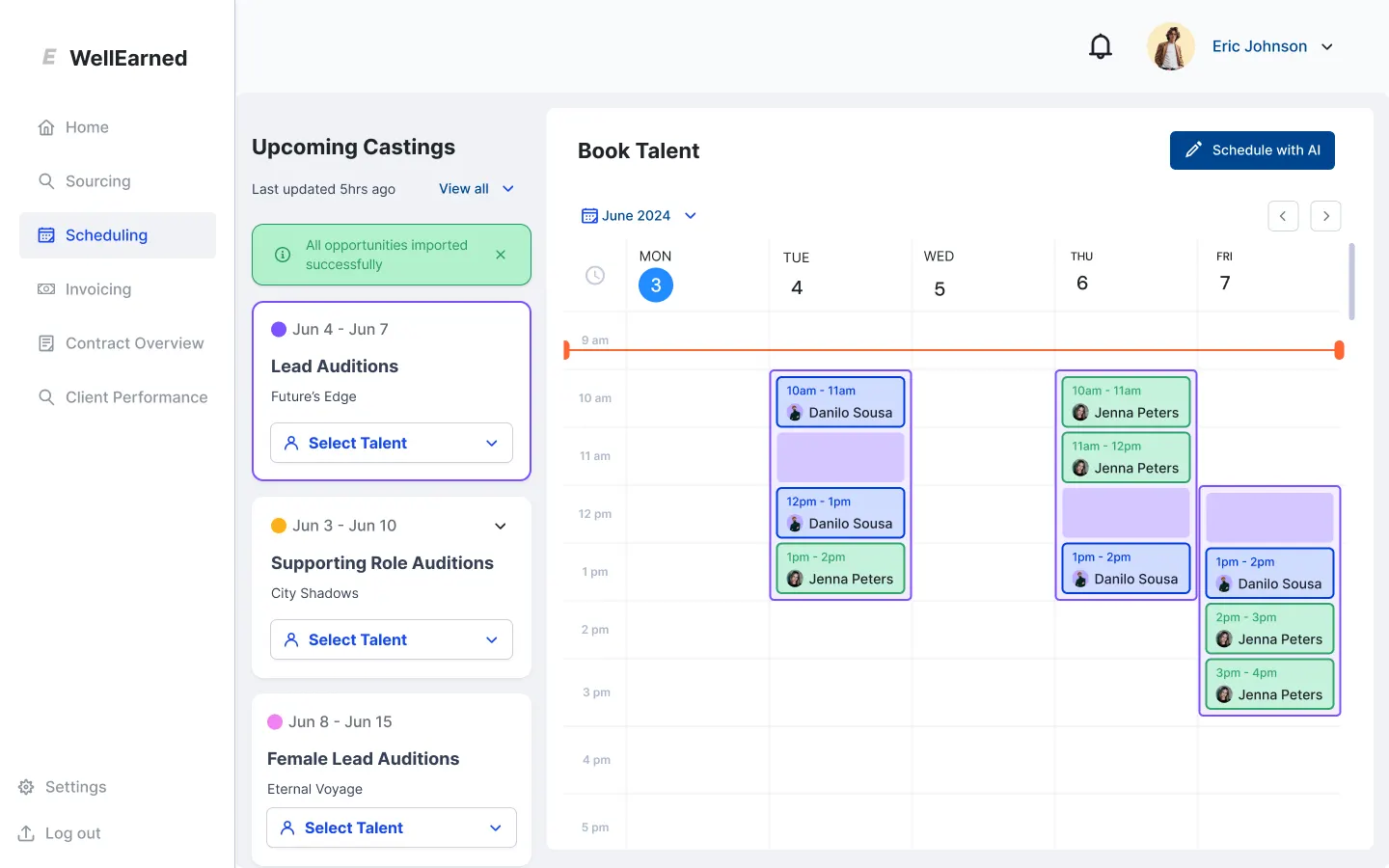
Scheduling was a screen you had to leave in order to do anything with it: thin on detail, and a navigation agents had to decode rather than read. I built the flow it never had — new components, a rebuilt user flow, and a board where the projects in the pipeline sit next to the dates they need people for.
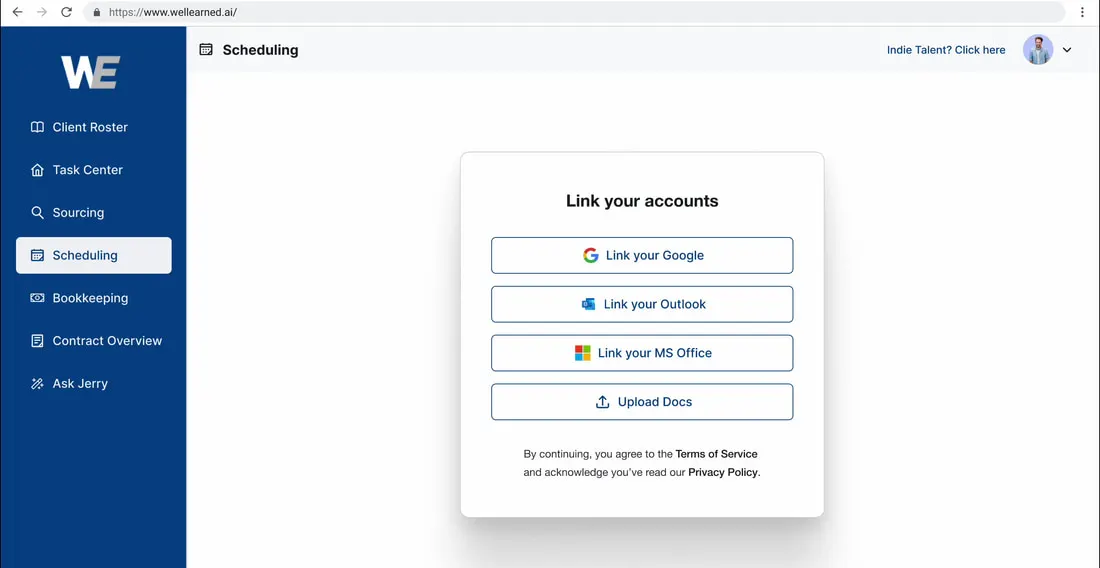
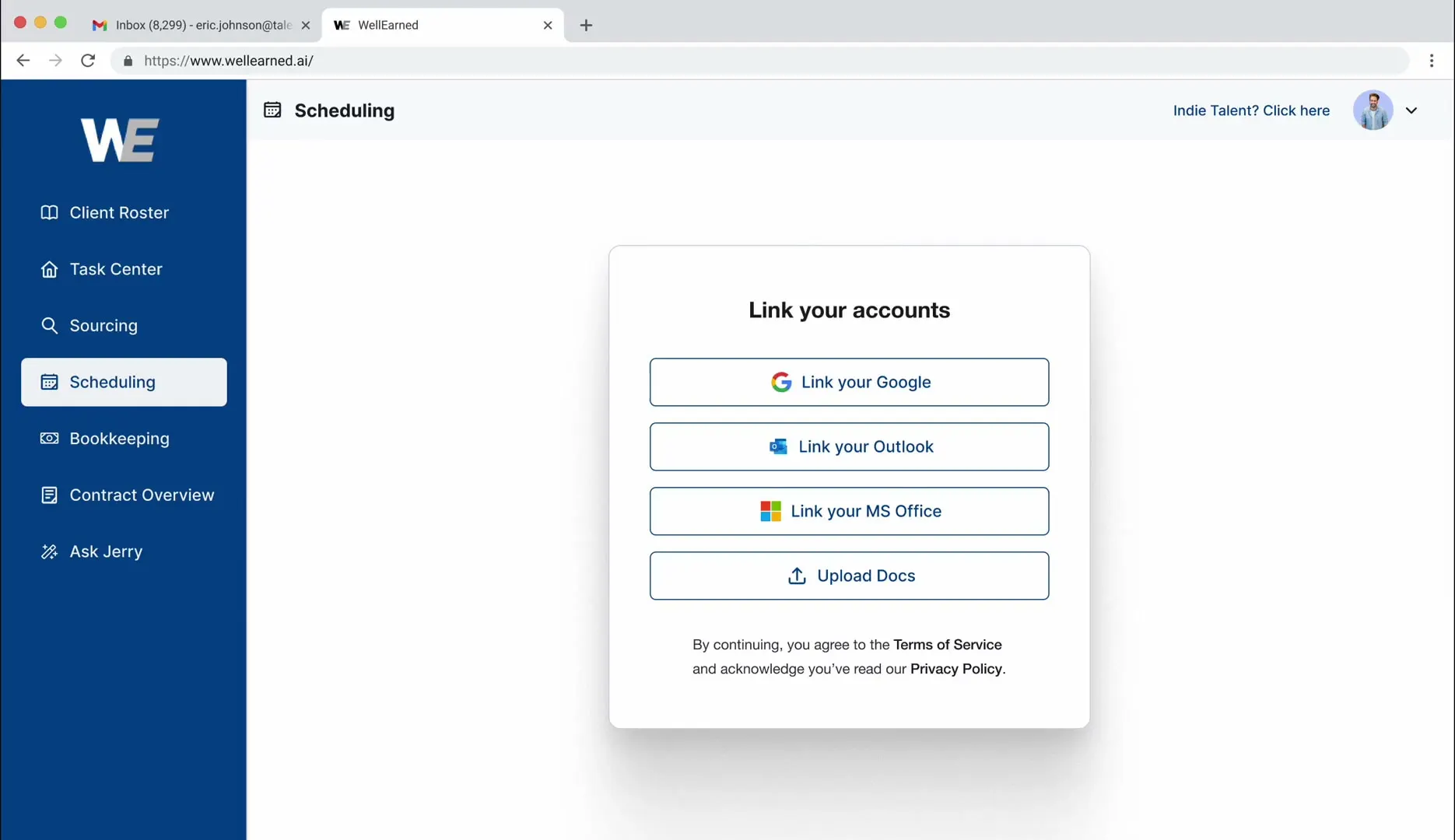
The live WellEarned scheduling page in a browser window: an empty page with a single centred card offering to link a Google, Outlook or Microsoft Office account, beside a sidebar of seven navigation items
before — a setup step where the schedule should be, and a sidebar to decode
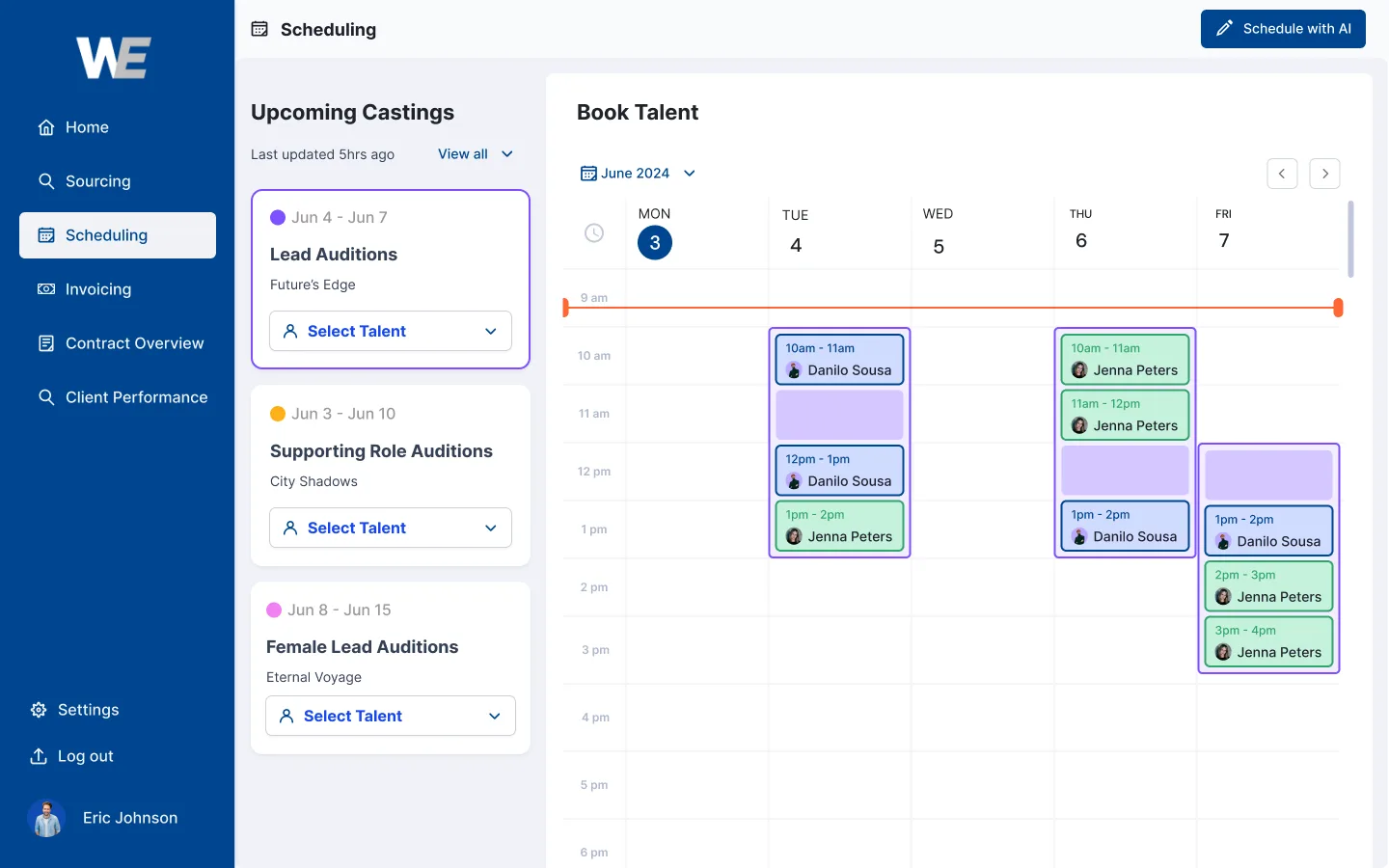
The redesigned WellEarned scheduling screen: a left sidebar, an Upcoming Castings column listing lead, supporting and female lead auditions with Select Talent controls, and a week-view Book Talent calendar with coloured booking blocks for each artist
after — upcoming castings, the week, and the import confirmed in place

The email integration is the feature. With the agent's account linked, the projects in the pipeline arrive on their own and bring their audition dates with them, so finding the right candidate for the right date becomes a matter of reading one board instead of cross-referencing three.
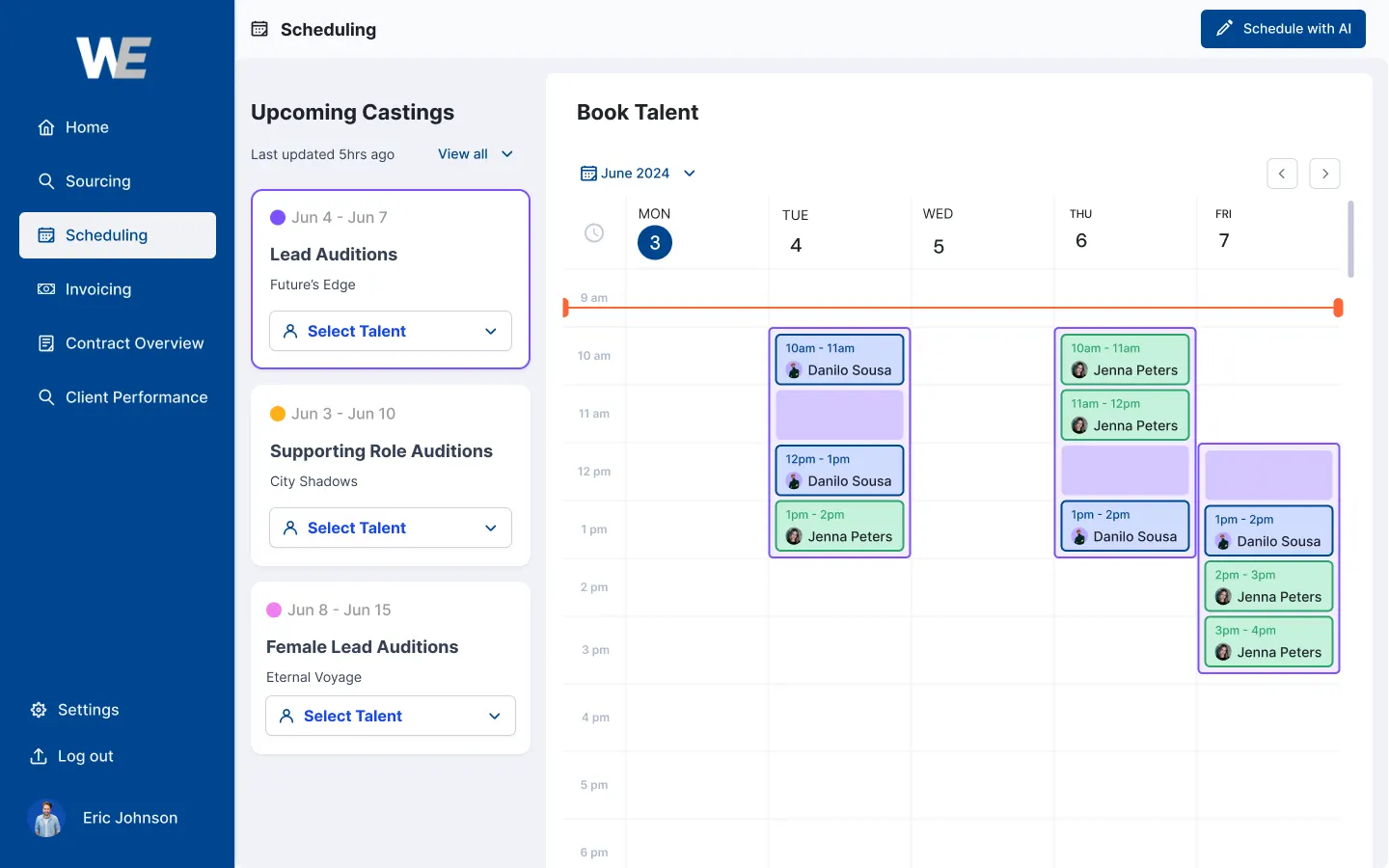
Two options for the same screen.

option 4 Scheduling option 4: the same castings column and week calendar behind a navy sidebar carrying the WellEarned mark at the top, Home, Sourcing, Scheduling, Invoicing, Contract Overview and Client Performance in white, and Settings, Log out and the agent's photo and name pinned along the bottom
option 4 — navy rail, the agent's own chip at the foot of it
option 1 Scheduling option 1: the same screen with a white sidebar and the navigation in dark type, the agent's photo, name and a notification bell lifted into a header of their own above the castings column and the week calendar
option 1 — quiet rail, the account lifted into a header
Same board, two rails. The difference is where the agent's own account lives and how much of the screen the navigation is allowed to hold. Option 1 is the screen above — it is the one that shipped.

The platform as it ran.

walkthrough — linking a calendar, and the schedule filling itself in — 0:54
The recording runs on the platform's demo data. It opens on the account-linking dialog — the email integration the brief asked for — and walks the schedule as it fills in from a linked calendar, which is the pipeline the phase above describes.
Phase 2

Client roster — a hierarchy that survives a long page

A talent profile is a long page. Résumé detail, skills, previous employment and financials all arrive from different platforms, each of which orders them differently. I set the hierarchy instead: the few things an agent needs at a glance stay concise and visible, and everything else is ordered by how often it decides something.

When a page holds this much, hierarchy is the interface. Employment history and financial information belong one reach away, not one search away.

Phase 3

Sourcing — the roster and the pipeline, finally in the same room

This is where the two halves of the job meet. I organised sourcing so an agent can move through their client roster, see what each person is already committed to, and assign them to a project without colliding with one they are on already. Every role carries its own requirements, so the search for the right candidate starts from something concrete rather than from memory.

The sourcing flow, drawn

the talent pipeline, from inbox to submission

The inbox opportunities ingested from email

  1. S-01 Pipeline the table that fills itself
    • Populated from the emails already arriving
    • No re-keying, no second spreadsheet
  2. S-02 Search the agent's own query
    • Free-text query against the pipeline
    • Filter and sort the result by hand
  3. S-03 Triage select many, act once
    • Follow-up
    • Shortlist
    • Reject
    • Match
    • No action
  4. S-04 Profile one person, everything
    • The talent's own information
    • Applied, in process, completed
    • Relevant bookings, with a select column
  5. S-05 Submit one button
    • Applies the profile to every booking selected

Agents told me they were tracking potential talent in a separate, messy spreadsheet. This is what replaced it. The pipeline builds itself out of the inbox, the agent narrows it, and the last screen turns a shortlist into submissions without opening a second tool. Every branch that wasn't one of these five got cut. On a screen an agent lives in all day, every extra control has to pay rent.

Colour first, because everything after it inherits.

the token sheet — the named set, then the ramps

  • Primary Light

    the platform's own blue, and the primary action

    #00458F
  • Disabled

    still visible, plainly not available

    #F0F2F6
  • Success

    the booking went through

    #2BC128
  • Error

    the one thing that has to be read

    #FB2047
  • Warning

    a date, an invoice or a contract needs attention

    #FFB119
  • Black

    type at its heaviest

    #000000
  • White

    the field every screen is built on

    #FFFFFF
  • Neutral

    10 steps

    #1E202C #F0F2F6

  • Blue

    10 steps

    #001F40 #E6ECF4

  • Red

    10 steps

    #580010 #FFE8EC

  • Green

    10 steps

    #045B03 #EEFFEE

Seven named colours and four ramps of ten steps each, so contrast is a decision rather than an accident. A platform this wide gets built one screen at a time by people who will never all be in the same room. Naming the steps up front is what keeps screen forty looking like screen one.

04 The handoff

The specs went to development with a library attached.

The last phase of the process was delivery, and what went out was a library, not a stack of screens.

A component library is the only thing that keeps a platform this wide consistent after I stop drawing it.

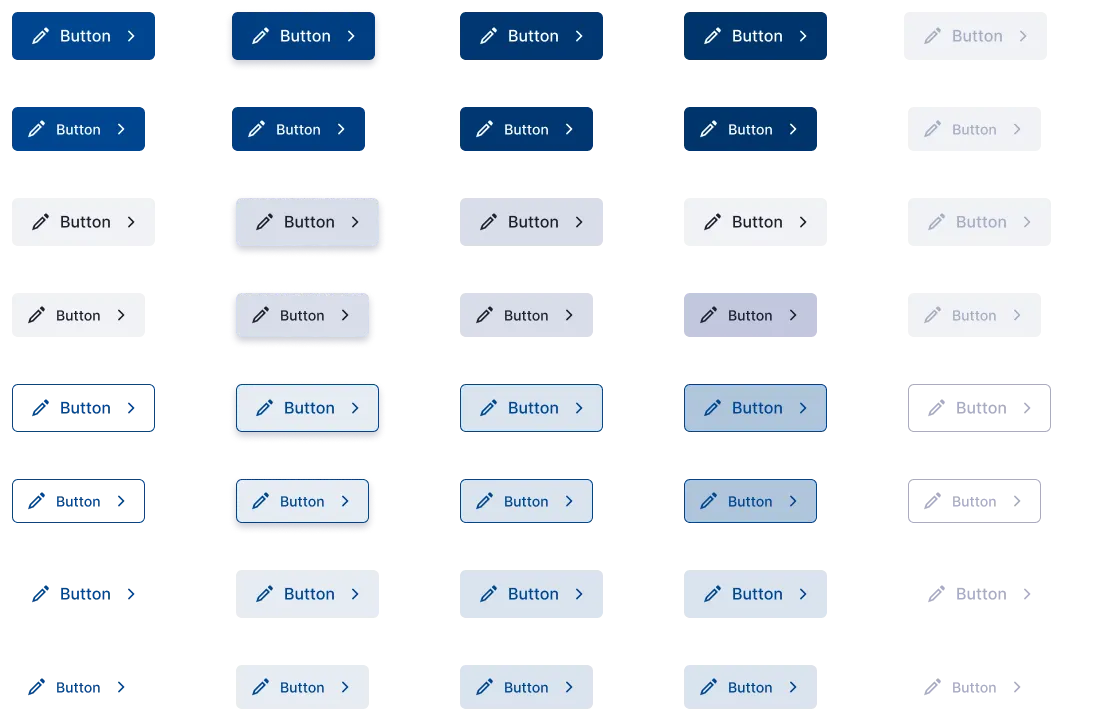
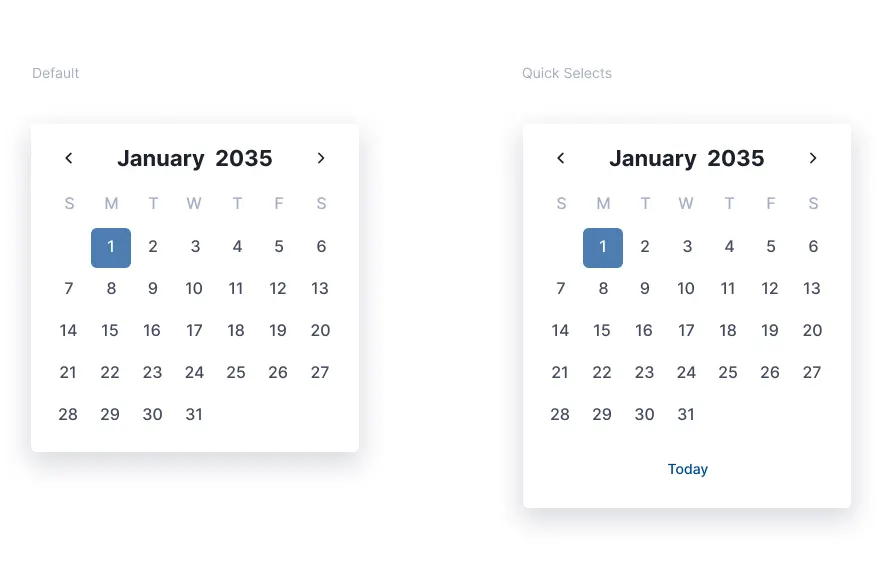
Every control went out with its states already decided: default, hover, focus, active, disabled — including the ones people only reach with a keyboard. The scheduling work in particular runs on date selection, so the picker got the same treatment as the buttons: a default variant, a quick-select variant, and one specification covering both.

The point of the library is what happens later: a screen I never designed still comes out looking like the ones I did.

The WellEarned button specification: a grid of eight button variants across five columns of state — solid, subtle, outlined and quiet treatments, ending in a disabled column
every state of every button, including the ones only a keyboard reaches
The WellEarned date picker specification: a default January calendar with the first selected, beside a quick-selects variant that adds a Today shortcut
the scheduling primitive — one spec, two variants

05 The evidence

It came down to three sentences.

From the five opening interviews: the findings every decision above had to answer.

Agents need an 'at-a-glance' view of their day first thing in the morning.
Finding 01 from five agent interviews
Searching for a specific client's contact info or headshot is a major time-sink.
Finding 02 from five agent interviews
Tracking the status of potential new talent (sourcing) is often done in a separate, messy spreadsheet.
Finding 03 from five agent interviews

They are reproduced as they were recorded in the research. The morning view became the scheduling board, the time-sink turned into one searchable roster, and the messy spreadsheet ended up as the sourcing pipeline.

06 Reflection

What the work taught me.

Deep domain research usually counts as preparation. On this project it was the design.

Talent management has its own physics. The way a booking, an audition and an availability window collide is nothing like a calendar app, and none of it is guessable from outside the industry. Understanding the specific nuances of these management platforms is what let me design something an agent would actually keep open all day.

What I'd do differently: five interviews told me what to build, but they can't tell me how widely any of it is true. With more time I would have run a wider survey to validate the interview findings against a much larger data set.

Five conversations were enough to build the right platform. A hundred would have told me which part of it to build first.